Subscribe to our newsletter to get weekly updates on the most essential apps and prompts in the generative AI space! 👇
ChatGPT Wants Your Medical Records & Fitness App Data
|
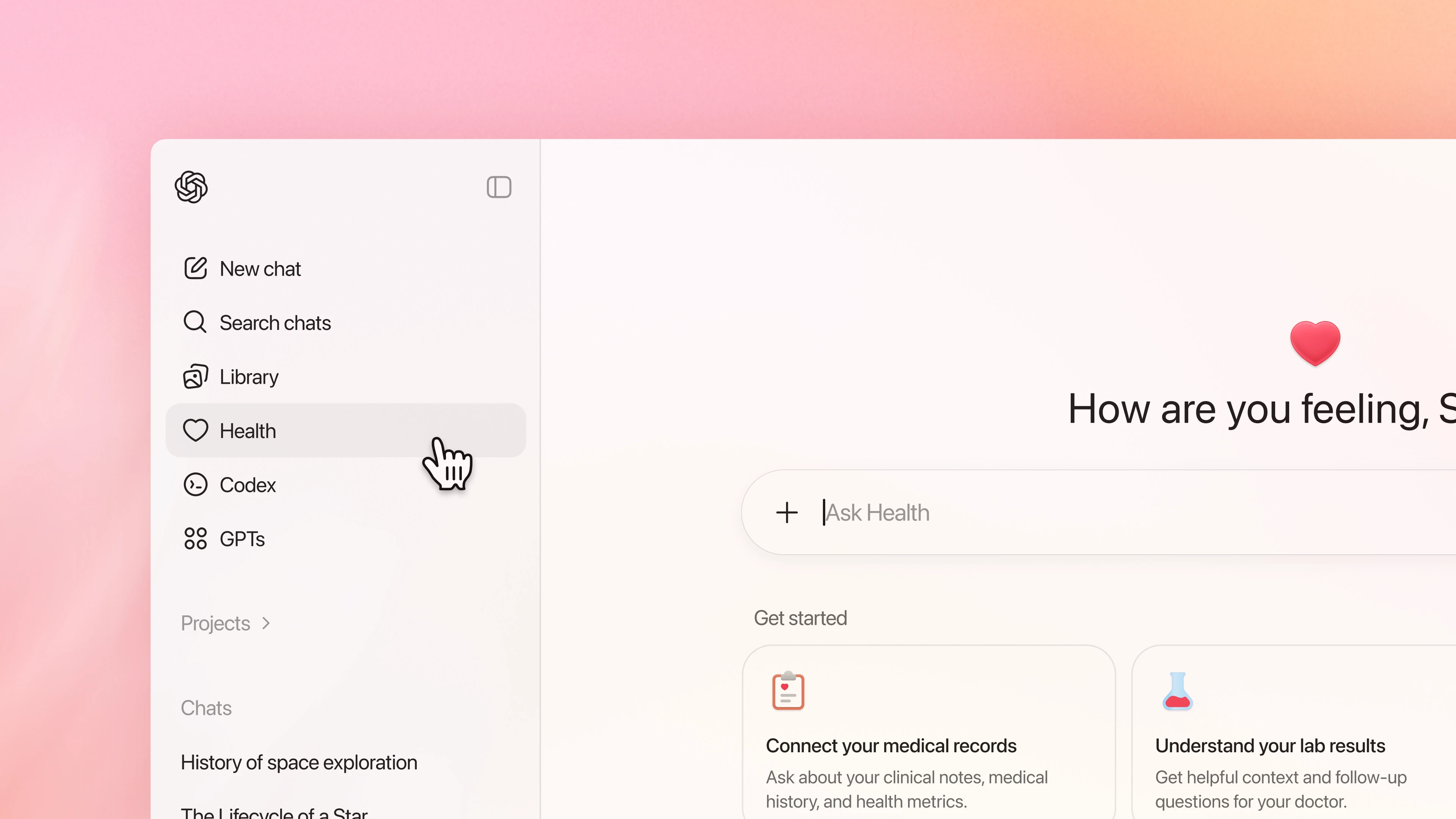
Hey Reader, Welcome back! This week, OpenAI launched ChatGPT Health, a brand-new system that can see users' medical records and fitness app data and use that context to act as a personal medical consultant. Below, we'll break down everything you need to know about ChatGPT Health, give you a prompt that makes home repairs easier than ever, share with you a new AI app that could change the way you edit photos forever, and more. Let's get right into it... 🪄 App of the Week: Higgsfield Relight Use Case: Quickly Edit Lighting in Any Image Link: Higgsfield Relight (Free to Try, Not Sponsored!) Why you should care: Other AI tools like Google's Nano Banana or ChatGPT Image are capable of editing images to change the lighting, but there's a catch: you can only control their outputs via natural language. After one of these chatbots misunderstands you five times in a row, you may find yourself wishing you had more control and a better way to communicate exactly what you want to the AI. That's exactly what Higgsfield Relight does best! You use an interactive, 3D globe to show the AI exactly where you want the lighting to come from and tell it exactly what intensity and color you want the light to be. Here's how to try Higgsfield Relight for free right now:
If you've been trying to figure out the best way to edit images with AI, go check out Higgsfield Relight today! 📰 News That Matters: OpenAI Launches ChatGPT Health
Link: Introducing ChatGPT Health | OpenAI Why it matters: And for the past three years, many upgraded from WebMD to simply pasting lab results into ChatGPT for an explanation. In fact, a recent study from OpenAI revealed that over 40 million users currently turn to the platform daily for health information. So what's next in this "tech for health" trend? OpenAI is hoping it's ChatGPT Health: a new service launched this week that lets users securely connect medical records and fitness app data directly to ChatGPT. ChatGPT Health allows the AI to look at your specific data to give contextual guidance rather than just general health advice. You can ask it to analyze workout trends from the past month, explain confusing blood work results, or help you prep for an upcoming doctor's visit by summarizing your recent health history. But let's address the elephant in the room: privacy. Even those who don't care much about their data privacy are going to have some reservations about handing over their entire medical history to any company. So what is OpenAI doing to address those concerns? For starters, ChatGPT Health lives in a completely "sandboxed" environment where your medical records and health conversations are siloed off from the rest of your ChatGPT history. What happens in Health stays in Health and won’t leak into your regular chats about recipes or vacation planning. OpenAI also confirmed that data shared within this health space is not used to train its foundation models. Your sensitive records won't become part of the collective intelligence of the next GPT update. And to handle the actual data connection, OpenAI partnered with b.well, a secure health data network that follows strict industry security standards. Users have to explicitly authorize every connection, and you can revoke that access or delete your health "memories" at any time. OpenAI is also focusing on clinical safety. They spent two years working with over 260 physicians to fine-tune how the model responds to medical queries, ensuring it knows when to explain a lab result and when to tell you to stop chatting and head to the ER. Is it a perfect solution? Probably not. No digital system is 100% bug-free and unhackable, and the stakes for medical data couldn't be higher. But for the millions of people already using AI as a makeshift doctor, ChatGPT Health offers a layer of professional guardrails and privacy that the "wild west" of standard prompting just didn't have. ChatGPT Health is rolling out via waitlist right now, but the ability to pull in actual medical records is currently limited to U.S. users. If you're interested in checking out this new era of AI for health, go sign up for the waitlist today! 📝 Prompt of the Week: If You Teach a Man to Fix... Prompt Formula: Quick Description: Use this prompt the next time something in your home breaks to save yourself some time and headache! How to Use:
Once you've read through the crash course ChatGPT creates, you'll have the knowledge needed to diagnose the issue on your own and maybe even fix it yourself! 📽️ Video of the Week: Razer PROMISED they’d release this The most interesting announcement from CES 2026 so far has been Razer's Project Ava: a physical device that sits on your desk and displays a Grok-powered hologram for you to interact with. While a quick Google search will get you plenty of opinions on Project Ava, it's harder to find footage of somebody actually interacting with it. Watch this video to see Riley from ShortCircuit using Project Ava at the Razer booth and see what this new kind of AI device is like in real life! 🎤 Discussion of the Week: Personalized Video AI Avatar Breakthrough One of the best things about The AI Advantage community is seeing members build, ship, and share what they’ve created. This week, AI Amplifier club member Albert did exactly that, showing off a high-quality animated AI avatar he recently built. Members showered the post with likes (the most of any post this month!) and hopped into the comments to praise Albert for his accomplishment and ask for advice on how they could do the same. Albert generously offered to teach the technique to those who sent him a private message on the community platform. This is exactly what makes the AI Amplifier Club so valuable: seeing real examples, asking real questions, and learning from people who are actively building with AI right now. If you want to:
Then join the conversation! Sign up for the AI Amplifier Club for $1 for your first 30 days. That's all for this week! See you next Thursday. Much Love, Follow The AI Advantage: Written By: |

Hi! I'm Igor with The AI Advantage.
Subscribe to our newsletter to get weekly updates on the most essential apps and prompts in the generative AI space! 👇
Hey Reader, Welcome back! The battle between OpenAI and Anthropic for dominance of the AI landscape continued to rage this week, although the shots weren't quite as direct. Rather than multi-million dollar Super Bowl commercials and social media rants, this week's battle featured model releases, platform updates, big hirings and even bigger milestones. Let's get right into it... 🪄 App of the Week: Claude's Free Upgrades Use Case: Best All-Purpose Free AI Platform Link: Claude (Free, Not...
Hey Reader, This was a massive week in AI with two of the biggest players in OpenAI and Anthropic deciding it was time to end the "AI cold war" and engage in straight-up fisticuffs. We'll break down the unfolding battle between OpenAI and Anthropic in our News That Matters section, plus we'll show you how to use the new Interactive Responses in Claude, share a short tutorial video on one of Gemini's best features, and more. Let's get right into it... 🪄 App of the Week: Claude Interactive...
Hey Reader, Welcome back! This week, Anthropic and NASA combined forces to achieve a first for humanity, and we'll talk about what Claude on Mars means for the future of AI and human space travel in News That Matters. Plus, we'll break down all of the new AI features coming to Chrome browsers, share with you a prompt that you can use to improve your ChatGPT Memories, and more. Let's get right into it... 🪄 App of the Week: All-New Gemini in Chrome Features Use Case: Upgrade Your Web Browsing...